• Skip to primary navigation
  • Skip to main content
  • Skip to primary sidebar

Moto X Owners Community

  • Home
    • About
    • Forum
    • Register
  • Online User Guide
    • Moto X Layout
    • Turn on and off Moto X
    • Insert SIM card to Moto X
    • Notification icons in Moto X
    • Moto X finger (touch) gestures
    • Voice commands
    • Using Camera
    • Touchless Control Settings
    • Troubleshooting for Touchless Control
    • Touchless Control: FAQs
    • Motorola Assist
    • Active Display
    • Wireless Display
    • Motorola Connect
    • Active Notifications
    • Contact Us
  • How-to Guide
    • How to take screenshot on Moto X without using any apps?
    • How to add custom ringtones for Moto X?
    • How to reset Motorola Assist?
    • How to turn Moto X into silent mode?
    • How to to access developer options in Moto X?
    • How to setup and use Motorola Skip with Moto X
    • How to solve battery life problem of Moto X after KitKat (Android 4.4) update
    • How to add Flash Player support on Moto X (especially after KitKat update)?
    • How to reset Moto X?
    • How to connect Moto X with PC through USB cable?
    • How to manage files on Moto X with ES File Explorer File Manager?
    • How to use Wi-Fi Direct to transfer files on Moto G, Moto E and Moto X?
    • How to use USB On-The-Go (USB OTG) on Moto X?
  • User Manual
    • Official Moto X4 User manual (User guide for Moto X 4th Gen , Moto X 2017)
    • Moto X 2015 user manual: Moto X Pure edition, Moto X Style and Moto X Play
    • Moto X 1st Gen User Manual
    • Moto X 2nd Gen User Manual (Moto X 2014 User Manual)
  • Buyer Guide
    • HTC One vs Moto X
    • Moto X Case (cover) Guide
    • Accessories Guide
      • Moto X Case (cover) Guide

google

Why Moto X failed to save Motorola?

March 10, 2014 by simon 4 Comments

motox-motorola-lenovoLenovo’s $2.91 billion acquisition of Motorola  will be approved soon. Motorola Mobility, a Google company, will soon become a Lenovo company.

Moto X, the last bet of Motorola, failed to rescue Motorola from being sold. Bye bye Motorola!

It is a tragedy for all our Moto X fans. 

After 6 months, Moto X is still unique and attractive, compared to recently announced Samsung Galaxy S5 and SonyXperia Z2.

But why did Moto X fail to fly? I believe you may have the same question.

USA is not the whole world

The tagline of Moto X is “The only smartphone assembled in the U.S.A”  or “The first smartphone designed, engineered and assembled in the USA”.

It is a smart marketing strategy for US market.

But it is not a good sales strategy if you make it “the only smartphone that are exclusive to USA (and Canada)“.

After Motorola was bought by Google, most international operations stopped. This may save cost, but reducing sales and marketing power in such regions also means giving up such markets.

Moto X got excellent reviews from most technical media and geeks. But the reception of US consumers is another story. The sales of Moto X in US is far below the expectations from the launch day.

At the same time,  a lot of international consumers are excited about this phone,but it is not available for them. Technical difficulties in touchless control for non-English languages are just an excuse. Please remember voice command with non-English languages had been used in many old smartphones.

Even for British English, it tooks Motorola 3-4 months  to figure out.

Putting all eggs in one basket! Even your grandma knows this is not a good idea. But these well-paid MBAs ignore this simple principle.

After more than 6 months, Moto X finally will go to more non-USA regions. But who cares about a 6-month-old smartphone when the life cycle of the smartphone is just about 12 months?

Stupid pricing strategy

The hardware specs put Moto X among the middle range smartphones.

Of course, the software puts Moto X in … Continue to read....
Filed Under: Moto X Phone News, Moto X Phone Reviews Tagged With: google, lenovo, moto x, moto x camera, motorola, touchless control, usa

Top 10 improvements in Android KitKat update for your Moto X

November 24, 2013 by simon 24 Comments

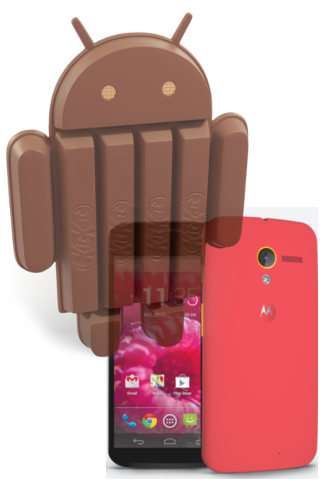
Moto X  with Android 4.4 kitkat Motorola beats all Android smartphone makers again with the Android 4.4 (KitKat) update!

When Samsung, HTC, Sony and LG are still struggling to push Android 4.3 (Jelly Bean 4.3) update for their flagship phones, Motorola gives us the KitKat treat. We got this Android 4.4 update even a few days earlier than the owners of pure Android Nexus 4.

And it seems the update works very smoothly. Most Moto X owners are enjoying the updated phone. As a contrast, a lot of Samsung Galaxy S4 owners are grumbling about the latest Android 4.3 update.

There are quite a lot of improvements in the Android 4.4 (KitKat) update for Moto X. In this post, you will learn the top 10 improvements or new features you may enjoy everyday.

1. Unified messaging  with Hangouts

If you have  mixed contacts on phone and Google, you know all the contacts are combined in your phone.  The new Hangouts app now moves a step further: it can (optional) combine your messages (SMS, MMS) with all other conversations in Hangouts. With the new Hangouts app, all of your SMS and MMS messages are together in the same app, alongside your other conversations and video calls.

The new Hangouts app also allows  you  to share your location and send animated GIFs. This makes it better than the most popular SMS app: WhatsApp.

Essentially, the new Hangouts app eliminates the need of a separate messaging app. Of course, if you are not ready for this change, you can still use messaging and Hangouts individually (although they share the same contact list).

2. Drag to focus and expose

You can focus on any location on the viewfinder by just dragging the crosshair to the desired objects or location. Moto X will automatically adjust the expose and lighting conditions for the photo.  The result is better image quality.

This is actually a nice enhancement of  the old  “touch to focus”.  You now get the option with a new circular, on screen control that can be dragged by your finger around the viewfinder to adjust a photo’s focus and exposure.… Continue to read....

Filed Under: Moto X Phone Guide, Moto X Phone News, Moto X Phone Reviews Tagged With: android, Android 4.4, camera, gallery, google, hangouts, jelly bean 4.2, keyboard, KitKat, mms, moto x, quickoffice, sms, touchless control, update

Moto X will be officially announced on August 1: will it be a game changer?

July 20, 2013 by simon Leave a Comment

moto-x-eventFinally, the birthday of the Moto X was confirmed. It will be on August 1, 2013.

According to Business Insider, Motorola is sending out invitations for the Moto X event in New York on August 1. Obviously, Moto X will be announced in this event.

We will see this long -awaited smartphone on the stage in New York.  The rumors will stop then.

It is the last chance for Motorola Mobility  in the fast-growing mobile phone industry. This is the sad fact for the past market leader in this industry.  We are interested in this Moto X phone based on rumors; but we are more eager to know whether the 12.5 billion Google acquisition will save Motorola or will accelerate the death of Motorola.

Moto X  is the first smartphone project in Motorola with Google’s leadership.  Will it be a game changer?

The rumored specs ( 2GB RAM, 16GB/32GB storage, 10MP  clear pixel camera, 1.7GHz dual-core Snapdragon processor, 720p HD display) indicate Moto X is targeting the middle range market. This market is volatile because major players just provide a strip-down version of the high-end flagship models. Potential users are driven away to either high-end or budget end, because there are no exciting offers in this category.

So, aiming at mid-range market is a smart move, if Motorola prices the Moto X wisely.

Currently,  most high-end smartphones are overpowered, for example, a full HD display on a 4-5″ screen does not make sense, but all manufactures are in the race of hardware, because this is the easiest way to “differentiate” to competitors. Eventually, consumers are over-paying.

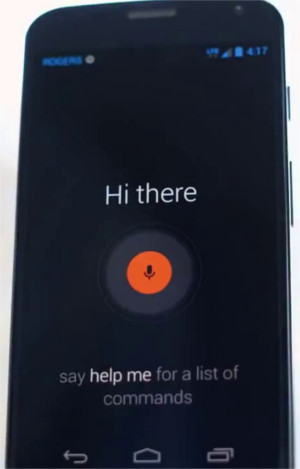
What was overlooked is the day-to-day user experience.  Based on the leaked (official) Roger video, Moto X does a quite good job in this aspect. For example, the always-on voice activation (OK Moto Magic), notification screen when screen is off, double twist (although  a bit awkward, maybe customizable) to launch camera.

Moto X will very likely come with Android 4.3 with very minor customization. It is not Nexus, but user experience will be very similar. Although it is arguable whether the … Continue to read....

Filed Under: Moto X Phone Guide, Moto X Phone News, Moto X Phone Reviews Tagged With: android, camera, clear pixel, google, moto x, motorola, OK Moto Magic

OK Moto Magic: Moto X Phone officially leaked by Eric Schmidt (photo) and Rogers (video)

July 14, 2013 by simon 1 Comment

moto-x-phone-rogers-2After the teaser in July 3rd, a new wave of teasers of Moto X are available to the public this weekend. Now the exterior, camera and voice control  are quite clear from the official videos and photos.

Eric Schmidt, the Google Chairman,  was using a Moto X phone publicly at the Sun Valley Conference “Camp for billionaires”.

The photo confirmed Moto X is not a giant phone, very likely less than 5″. So,  the size is similar to Nexus 4 or even older Galaxy Nexus.

moto-x-phone-rogersThe thickness suggested the battery probably is quite large. The battery capacity is very likely somewhere close to 3000mAh, which is comparable to Droid Razr Maxx’s 3300mAh.

The exterior material is plastic without the metal rim as in Samsung’s. The back can be  customized  as suggested in the official teaser page. Plastic make senses for quick  customization.

For the camera, the official Motorola Mobility account tweeted some blurred photos and mentioned “Either this kid is really fast, or today’s phones are really slow.”  #AlmostGotIt pic.twitter.com/mdMEOGqfhr This indicates Motorola wants to remind us there are significant improvement on camera. Maybe not on the number of pixels, but more on the image quality for real life.

The most juicy leak is the commercial Rogers (a Canadian Telecom company) prepared for the launch of Moto X.  In the long (close to 2 mins) video, you get a closer look of the Moto X phone.

Some unique features are illustrated in the video. For example, double twist to launch the camera.  The voice control and new notification also makes the phone standing out. Apparently, these new features are quite practical, not just software gimmicks in Galaxy S4.

http://www.youtube.com/watch?v=WCucvQ1VuOk

The technical specifications are still a secret. But based on rumors, the phone will feature 2GB RAM, 16GB/32GB storage, 10MP camera (non-conventional one) , 1.7GHz dual-core Snapdragon processor, 720p HD display

What do you think about Moto X Phone? Share your thoughts in the comment box below!

 … Continue to read....

Filed Under: Moto X Phone News, Moto X Phone Reviews Tagged With: android, camera, Eric Schmidt, google, google now, moto x phone, motorola, OK Moto Magic, Rogers, twitter, voice, youtube

Will Moto X Phone Save Motorola?

July 6, 2013 by simon Leave a Comment

moto-x-phone adsTime is almost running out for Motorola Mobility in the handset battlefield.

Samsung now dominates Android handset with its Galaxy series, from budget to the top, from 3″ to 10″. HTC, LG, Sony, Huawei, ZTE are all gearing up for the 2nd place in the crowded Android market. Motorola has been silently  losing its market share.

Apple, Nokia and Blackberry are all struggling to keep their grounds.

The Google acquisition is the last stimulus to revive Motorola. Moto X Phone probably is the last chance to save Motorola.

Both Motorola and its parent Google are betting the future of Motorola on Moto X . They simply do not have other options.

Although Google tries to distance itself from Motorola due to possible concerns from other Android handset manufactures, Moto X Phone is very likely a deep collaboration between Google and Motorola.

After months of rumors, before the Independence Day,  Motorola finally revealed some (and very limited) info on this hyped Moto X Phone officially:

The first smartphone designed, engineered and assembled in the USA is coming.

It’s also the first smartphone that you can design yourself. Because today you should have the freedom to design the things in your life to be as unique as you are.

And this is just the beginning. By the end of the summer we expect there to be more than 2000 new employees in Ft. Worth, TX working to make all of this possible. Imagine what else you can do when you have the world’s best design, engineering and manufacturing talent located here in the USA.

Essentially, Motorola pitches this phone on “freedom”: the freedom you have on the design. This is something truly interesting.  You can now register on Motorola’s  website to receive updates on this phone.

Highlighting American-made may resonate with some American consumers.  This is a perfect card for Motorola because US is its major market and in other market, it is marginal except in India.

The freedom is on design. The speculations are naturally on color, engraving, and wallpaper. According to ABC News,

Through a website, buyers will be

… Continue to read....

Filed Under: Moto X Phone News Tagged With: android, customization, freedom, google, moto x phone, motorola, sensor, usa

Primary Sidebar

RSS Galaxy S24 Guides

  • The definitive guide to One UI 7 (Android 15) update for Galaxy S24, S23, S22, and S21
  • The Definitive Guide to Galaxy AI on Galaxy S24, S23, S22, Fold 6, Fold 5, Flip 6, and Flip 5
  • Use the Light Performance Profile to Extend Battery Life and Reduce Heat on Galaxy S24, S23, S22, and S21 (all Samsung Galaxy Phones with Android 14/One UI 6.0)
  • How to adjust lock screen timeout on Galaxy S24, S23, S22, and other Galaxy devices?
  • How to use Circle to Search on Galaxy S24?
  • Meaning of Galaxy S24 status icons and notification icons on Galaxy S24, S24+, and S24 Ultra
  • Samsung Galaxy S24 Smart View Wallet Case: A Definite Guide
  • Understand Galaxy S24 Camera App
  • Galaxy S24 Flipsuit Case: A Definite Guide
  • How to use the new Battery Protection on Galaxy S24?

RSS Galaxy S23 Guides

  • Explanation of all One UI 6.1 features for Galaxy S23, S23+, S23 Ultra, and other Galaxy devices
  • How to use One-Tap Editing in the Android 14 (One UI 6) update?
  • How to enable and use Auto Scan to scan documents automatically on Galaxy S23, S22, and S21?
  • New camera features in One UI 6 (Android 14) update for Galaxy S23, S22, and S21

RSS Galaxy S22 Guides

  • A Complete Guide for Android 14 (One UI 6) Update on Samsung Galaxy Devices
  • How to touch and hold to customize Lock Screen on Galaxy S22, S21, and S20 with the Android 13 update?
  • How to use Maintenance Mode on Galaxy S23, S22, S21, and S20 with Android 13 (One UI 5)?

RSS Samsung Galaxy S21 Guides

  • Top 12 new features in Android 12 update for Galaxy S21, S20 and S10
  • Android 12 update vs One UI 4.0 vs One UI 4.1: update Galaxy S21, S20 and S10 to Android 12
  • How to set and resize photo size on Samsung Galaxy S21, S20, S10, and S9 without using any third-party apps?

RSS Android Guide

  • A Complete Guide to Android ADB Wireless Debugging
  • Android 16: the definitive guide on new features and changes
  • Master Android 15 Easter Egg Game: Landroid

RSS Chromecast Guide

  • How to enable developer options in Chromecast with Google TV and Google TV Streamer?
  • Meaning of LED light on voice remote for Chromecast with Google TV and Google TV Streamer
  • What’s new in Chromecast 2018 (3rd gen of Chromecast)?
  • How to use VLC media player on PC to stream music and video to Chromecast and Chromecast Audio?
  • How to use Chromecast Ultra to stream 4K content?
  • How to disable Google Home and Chromecast casting notification?

RSS Google Home Guides

  • How to Use Quick Gestures on Nest Hub 2nd Gen and Nest Hub Max?
  • Understand the layout of Nest Hub (including Nest Hub 2nd Gen, Google Home Hub)
  • How to control Nest Audio?

RSS Galaxy Note Tips & Tricks

  • Top 11 disappointments of Galaxy Note 20 and Galaxy Note 20 Ultra
  • How to use the Dynamic Lock screen on Galaxy Note 10?
  • Galaxy Note 10 LED View Cover Guide and Review

RSS Moto G Guide

  • Stylus features on Moto G Stylus (all models)
  • What’s new in Moto G 2024? Moto G 5G 2024 vs Moto G Power 2024 vs Moto G Play 2024
  • Understand Moto G Model Names
  • Thank You

RSS Kindle Fire for kids

  • Fire Tablet Buyer’s Guide 2025
  • How to use Writing Assist on Fire Tablet?
  • How to use Wallpaper Creator on your Fire tablet?

RSS Headphone Guides

  • Bluetooth LE Audio and the LC3 Codec: A Technical Deep Dive
  • The Physics and Engineering of Super Wide Band (SWB) Voice
  • True Wireless Stereo (TWS) Explained
  • The Complete Technical Guide to the Galaxy Buds 4 & Buds 4 Pro
  • The Right Fit of Galaxy Buds 4 — User Personas & Recommendations
  • Galaxy Buds 4 as an AI Earbud — Tips, Tricks, and Galaxy AI
  • AirPods Pro 3: The Complete Technical Guide and Long-Term Review
  • The Flagship Face-off: Galaxy Buds 4 Pro vs. AirPods Pro 3, Sony WF-1000XM6, and Bose QC Ultra Earbuds II

RSS Galaxy S4 Guides

  • Samsung Galaxy S4 Manual for Verizon
  • Galaxy S4 User Manual and Handbook in English
  • Samsung Galaxy S4 User Manual and Handbook in Italian (Italiano)
  • Galaxy S4 User Manual and Handbook in Portuguese (português, Brazil)

RSS Moto E Guide

  • How to use Moto E6 camera?
  • Moto E6 Guides
  • Moto E 2nd Gen (Moto E 4G): the best value-for-money smartphone in 2015

RSS Samsung Galaxy S5 Guide

  • How to enter Galaxy S5 recovery mode?
  • How to set Galaxy S5 photo size and video size?
  • How to use Galaxy S5 camera voice control?
  • How to customize Galaxy S5 camera shortcuts menu?

RSS Chinese Classical Music

  • How to Cast Chinese Music Radio to Chromecast or Google Home?
  • 十面埋伏 (Ambushed,Pipa,琵琶曲,Shi Mian Mai Fu)
  • Meet in Yurt(敖包相会, Ao Bao Xiang Hui,Folk song,民歌)
  • Purple Bamboo Melody(紫竹调, Zi Zhu Diao,Yangqin,扬琴)

RSS Drive in Singapore

  • Singapore ERP (Electronic Road Pricing): 6 Facts You Need to Know
  • Car Insurance in Singapore Explained
  • Top 5 rules of driving in Singapore safely and legally during COVID-19 Circuit Breaker period
  • Understand COE Price by 10 Simple Questions

© 2013–2026 · Moto X Hub Guides: Everything about Moto X: how-to guide, user manuals, tips and tricks for Motorola/Lenovo Moto X, Moto X2, Moto X3, and Moto X4 · Hosted by PTRHosting · Powered by Genesis framework for WordPress
MotoX Hub.com: a community for Moto X owner help other Moto X owners
Disclaimer: Motorola. Moto, and Moto X are trademarks of Motorola Mobility/Lenovo. This website is NOT affiliated with Motorola Mobility LLC in any way. All the information provided on this website is provided on an "as is" and "as available" basis and you agree that you use such information entirely at your own risk.

We use cookies to give you the best online experience. By using our website you agree to our use of cookies in accordance with our cookie policy.
pixel