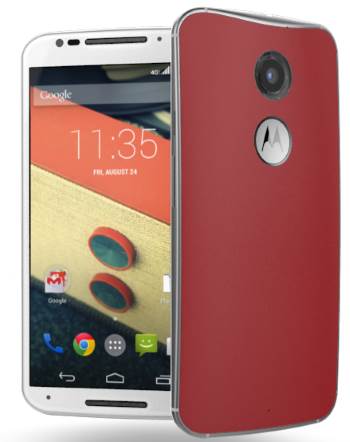
 The new Moto X, a successor for Moto X 2013 was announced early this month. You can pre-order this new Moto X (aka Moto X 2nd generation) from today..
Some Moto X owners are curious about what’s new in the new Moto X (Moto X 2nd generation). This post will give you the answer.
First, the official name of the new Moto X is Moto X 2nd generation (Moto X 2nd Gen), not Moto X+1 as rumored. Of course, many may just call it Moto X 2014.
Let’s check the comparison of Moto X 2nd generation vs Moto X 1st generation.
1. Cheaper: Moto X 2nd generation vs Moto X 1st generation
One of the biggest mistake preventing Moto X (1st Gen.) to get the deserved popularity is the stupid pricing strategy for the old Moto X in last year.
Although almost all potential buyers are excited with the unique features in Moto X 1st generation: touchless control (now it is re-branded as Moto Voice), Motorola Assist, Active Display and possible customization (through Moto Maker), they did not become a Moto X owner due to the wrong pricing strategy as analysed in this post: Why Moto X failed to save Motorola?
Moto X 1st generation was packed with middle-range hardware (with best software). The pricing Motorola asked is that for the smartphones with top-notch hardware.
For the new Moto X (Moto X 2nd generation), Motorola apparently corrects this mistake. The most advanced and high quality hardware, with the best (arguable) Android experience, is asking for a cheaper price!
The contract-free, unlocked 2nd generation Moto X (Moto X Pure edition) starts from $499. This is one of the most affordable flagship phones in 2014.
2. Faster: Moto X 2nd generation vs Moto X 1st generation
The new Moto X (Moto X 2nd generation) got a big update in processor and graphics. It is at least 3 times faster than 1st generation Moto X.
The second generation of Moto X is equipped with Quad-core 2.5GHz Qualcomm Snapdragon 801 (which has 3 times raw processing power than Snapdragon S4 Pro in the first generation of Moto X)
If we talk about graphics, the new Moto X (Moto X 2nd generation) comes with with Adreno 330 GPU, which is 50% faster than Adreno 320 GPU in the old Moto X.
Although for most owners, such a processing power is a overkill, it does make your Moto X very snappy.
3. Bigger: Moto X 2nd generation vs Moto X 1st generation
If you hate big smartphones, you choice is shrinking. Almost all flagship smartphones are getting bigger and bigger (or in Apple’s words, bigger than bigger). When the 5.3″ Galaxy Note was introduced in 2011, the common reaction is: is this still a phone?
Now,almost all “flagship” phones (usually with the best configurations) has a screen more than 5″.
Moto X is not an exception in size. It grows from 4.7″ to 5.2″ if you compare Moto X 2nd generation vs Moto X (1st Gen.).
Bigger usually means heavier. The new Moto X (2nd Gen.) is about 14g heavier (144g vs 130g). Not a big deal, actually.
4. Full HD vs HD: Moto X 2nd generation vs Moto X 1st generation
The 5.2″ screen in the new Moto X (Moto X 2nd generation) is not only bigger in size, but also larger in number of pixels.
Full HD (1920*1080) AMOLED screen with Corning Gorilla Glass 3 is what you get in the Moto X 2014. In the old Moto X (Moto X 2013), you get a HD 720p (1280*720) AMOLED screen with Corning Gorilla Glass 2.
5. New: Front-facing stereo speakers
Moto X 2nd generation finally gets the front-facing stereo speakers. In all situations, this will improve your listening experience if you compare the speaker to rear facing one.
Front facing sparklers can project the sound towards you, not away from you. This makes the sound not only louder, but also clearer, compared to ass-hole like rear facing speaker. Actually, the rear facing speaker is one of the major reasons why smartphone users seldom use the speakers in the phone.
6. Better camera: Moto X 2nd generation vs Moto X 1st generation
The old Moto X (Moto X 2013) gave us a very simple and efficient camera app. It is so simple that most new smartphone users can use it without much frustration.
But in camera hardware side, Moto X is hit-or-miss. Some Motox 2013 owners can take excellent photos; others may get poor quality photos very often.
In the new Moto X (Moto X 2nd generation), Motorola apparently chooses better quality camera sensors from Sony. So, better photo quality will be expected.
The number of pixels of the rear camera also increases from 10M to 13M. You can also shoot 4K videos.
Moto X 2014 also improved the LED flash with the flash ring. It sounds promising. But we need test it first because this is something new.
7. More choices: Moto X 2nd generation vs Moto X 1st generation
Customization is one of the most welcomed features for the old Moto X (Moto X 1st generation)
Now, the new Moto X (Moto X 2nd generation) simply offers more choices: more materials (e.g. leather), more parts that can be customized, and larger availability (European users can access Moto Maker soon!).
8. From Touchless Control to Moto voice: Moto X 2nd generation vs Moto X 1st generation
Touchless control is also getting better. Motorola re-branded it as Moto Voice.
You can create your own launcher phase ans use your own voice prompt.
9. Still no SD card support, 16GB is still the standard
Unfortunately, the new Moto X (Moto X 2nd generation) still does not support SD card. As a comparison, the new Moto G now has SD card support.
To make it worse, the standard configuration is still 16GB internal storage, so you get about 12GB usable storage. This means the number of big games you can install is very limited. Although 32GB is an option, the availability is limited.
10. Same battery capacity, same battery life
Actually, the old Moto X (1st Gen) has decent battery life and many owners are quite happy with it.
So, in the new Moto X (Moto X 2nd generation), Motorola packs a battery with identical capacity (2300mAH) as Moto X 2013. The battery life is similar: 24 hours of mixed usage, according to Motorola.
What do you think about the new Moto X 2nd generation vs Moto X 1st generation?
Please share your thoughts in the comment box below.


Either make a phone with at least 64GB minimum standard and/or allow for SD card, and/or, unlimited data from carrier. Until you can stream anything, anywhere with no down time off the meter, you need bigger storage on the phone or need ability to expand. got Moto X 5 months ago and love it other than I had to delete stuff off my phone already so it will work because of memory. the telecoms need to beef up the network if they want to go full cloud and expand the 10GB share plans or there will be a lot of unhappy customers.
Motorola probably should make 32gb as a base model, at least. It’s very strange most android manufactures still try to stick to 16GB for their flagship phones.
Apple is correct in this sense: they offer 16GB, but most users can easily get 64gb for iPhone 6.
For most android users, it’s very hard to get anything beyond the base model.
Is it possible to buy the Moto X (2nd gen) at a store in New York? Can’t find an answer on the internet. Thank you
until I can stream apps and games this no-sd card thing is a deciding factor. I play games that require more than 8gb. plus with such a high res screen, it stands to reason photos and high quality video are going to eat up a LOT of memory. the lack of an sd card slot kept me from buying the first gen and will continue to keep me away, even though I LOVE this phone.
I got a Moto X in May 2913 to the tune of $349.
I’ve had nothing but problems with it in under 5 months.
Freezes, shutdowns, camera failures (unreliable to the point where I carry my OLD phone to take pictures)
Tell me all about Moto2014 and I’ll still run away.
Samsung Avant has external SD card.
My LG L9 has external card.
I’m going external SD card and 32+ onboard memory or I’m out.
First last and never again Motorola.
I typically keep my phone until it dies–so I prefer phones that have a user replacable battery.
I also would like it to have a SD I/O port, but I think they probably think “Users don’t need a SD interface–they can connect their pocket computer to their desktop PC using the micro-USB port or through the internet
I just ordered the new Moto X. I’m upgrading from the 1st gen. model. I got the 16gb for both phones and it’s more than enough for me. I don’t play too many games so maybe that’s why. I love this phone and definitely wanted to stay in the Moto X family when I changed service providers.
Whatever memory issues you have can’t outweigh the durability and overall excellent performance of the whole moto phone line up offers… Love my g…. Bought my sister an e…… Upgrading to an x. Motorola is back!!!!